Wi-Fi 8 Explained: Why the Next Wi-Fi Chases Reliability, Not Speed
Wi-Fi 8 is not a speed upgrade. Here is how access point coordination works, when routers arrive and what to fix on your network first.
In this story 6 sections
Wi-Fi 8, built on the IEEE 802.11bn standard, aims for reliability instead of faster peak speeds. Its main tools are coordination between nearby access points and better interference handling. Routers announced in 2026 use draft chips, so a Wi-Fi 8 label today is a vendor claim, not a certification.
Every new Wi-Fi generation has promised more speed, so Wi-Fi 8 sounds backwards. This guide explains what Wi-Fi 8 changes, why a stable connection matters more than a bigger number, when you can buy it and what to try on the router you already own. It is written for anyone whose video call freezes while the speed test looks fine.
Oddworldz covers the plumbing behind everyday internet quirks, and this one starts in your living room.
What Is Wi-Fi 8 and Why Does It Skip Speed?
Wi-Fi 8 is the name for the IEEE 802.11bn amendment, nicknamed Ultra High Reliability. It skips a speed jump because many people already have more speed than their connection can use steadily. The weak spot is consistency, not the top number.
A research primer in IEEE Communications Magazine says next-generation Wi-Fi is set to prioritize Ultra High Reliability above all. The Institute of Electrical and Electronics Engineers (IEEE) is the body that writes the Wi-Fi standards. The same paper calls Wi-Fi 8 the first generation aiming to improve reliability, with a focus on service availability and delay guarantees.
The primer ties this shift to emerging applications with strict requirements. Think of video calls, cloud gaming and smart-home sensors, where one late packet hurts more than a slightly slower download.
The trade press has picked up the message. A recent MakeUseOf piece says Wi-Fi 8 is about making connections stronger, more stable and less prone to interference. Newegg's buying guide goes further and says peak speed does not rise at all.
The table below shows how the main priority has shifted across recent generations.
| Generation | IEEE standard | Main priority |
|---|---|---|
| Wi-Fi 6 | 802.11ax | Efficiency in crowded networks |
| Wi-Fi 7 | 802.11be | Higher speed and multi-link operation |
| Wi-Fi 8 | 802.11bn | Reliability and low worst-case delay |
Think of it as fixing the bumps rather than raising the speed limit. A road with a 120 mph limit does little for you if it has a pothole every mile.
How Does Multi-Access Point Coordination Work?
Multi-access point coordination lets neighboring Wi-Fi access points cooperate instead of competing. An access point is the box that broadcasts your Wi-Fi, such as a router or a mesh node. Today each one mostly decides alone when to transmit, so neighbors collide.

An analogy helps. Picture a crossroads with no traffic lights, where every driver goes when they feel like it. Cars bump, wait and honk. Coordination adds the signal, so each access point takes a turn or transmits at the same time as another in a way that does not clash.
A 2026 paper on 802.11bn core mechanisms describes the problem plainly. It says interference causes channel collisions, unpredictable tail latency and dropped packets, and that the standard's coordination framework is the fix. Access points announce that they can coordinate in their regular beacon messages. Neighbors read those announcements, pick partners, and send a teardown message when the shared transmission ends.
The same paper describes a second tool called interference mitigation. It helps devices with several antennas detect and suppress interference in real time. Where coordination keeps access points from clashing, mitigation cleans up the noise that still gets through.
Tail latency is the delay that the slowest few requests suffer. Engineers often quote the 99th percentile, or P99, which is the delay that 99 percent of requests beat. A smooth average can hide a few awful spikes, and those spikes are what make a call stutter.
Newegg reports that ASUS claims up to six times lower P99 latency from multi-AP and multi-client coordination. Treat that as a marketing figure until independent labs test shipping products. It does show where the industry is aiming.
Why Does Wi-Fi Drop in Crowded Homes?
Wi-Fi drops in crowded homes because many devices and neighboring networks share the same radio airwaves. The more signals compete, the more often transmissions collide and must be repeated. Your plan's speed does not change, but your effective delay does.

The Federal Communications Commission (FCC) says in its home network tips that many devices on one network can create lag. It also notes that other Wi-Fi networks in range can hurt performance. Those are the two problems coordination aims to ease, at least among compatible access points.
Regulators are also freeing up more room. An FCC fact sheet says its January 2026 order expands unlicensed use of the 6 GHz band. Devices there are expected to share the band with other unlicensed devices, which is another reason sharing manners matter.
Consider a video call. It does not need a huge pipe, only a steady one. If a collision forces a repeat every few seconds, the picture freezes even though a speed test shows plenty of capacity. That mismatch is exactly what Wi-Fi 8 is trying to close.
Coordination only helps when the neighbors' gear speaks the same language. In a block where half the routers are old, the gains shrink. Plan for a gradual benefit, not an overnight fix.
Not every slow connection starts in your home, either. When a subsea cable fails, whole countries slow down, as we explained in our piece on the undersea cable fault that slowed Pakistan's internet. A better router cannot fix a problem upstream.
When Can You Actually Buy a Wi-Fi 8 Router?
You can preorder a few Wi-Fi 8 routers now, but they are early products. Tom's Hardware reports that TP-Link's Archer 8 Ultra opened preorders on September 30 in select regions, with the Deco 8 Ultra mesh system arriving in the first quarter of 2027.
The catch is the paperwork. Newegg's guide says routers announced in 2026 run draft silicon against an unfinished specification. It adds that a Wi-Fi 8 badge today is a vendor claim rather than a certification, and that certification does not arrive until 2028. At Oddworldz, we found that retail guides disagree on the exact certification date, so treat any date as an estimate.
Wi-Fi 8 also needs matching devices. Your phone and laptop must include a Wi-Fi 8 chip to get the full effect. Phone makers decide which models get new radios, and how long a handset stays supported is a separate question. Our guide on how long your phone gets software updates is a useful companion when you plan a household upgrade.
History offers a rule of thumb. Early adopters of a new Wi-Fi generation often pay a premium for products that later get cheaper and better. Waiting a year usually costs you little.
Should You Wait for Wi-Fi 8 or Fix Your Current Network?
Most people should fix their current network first. Better router placement, fewer devices on Wi-Fi and a wired connection for fixed gear solve a large share of dropouts. The FCC lists these steps for any home network.
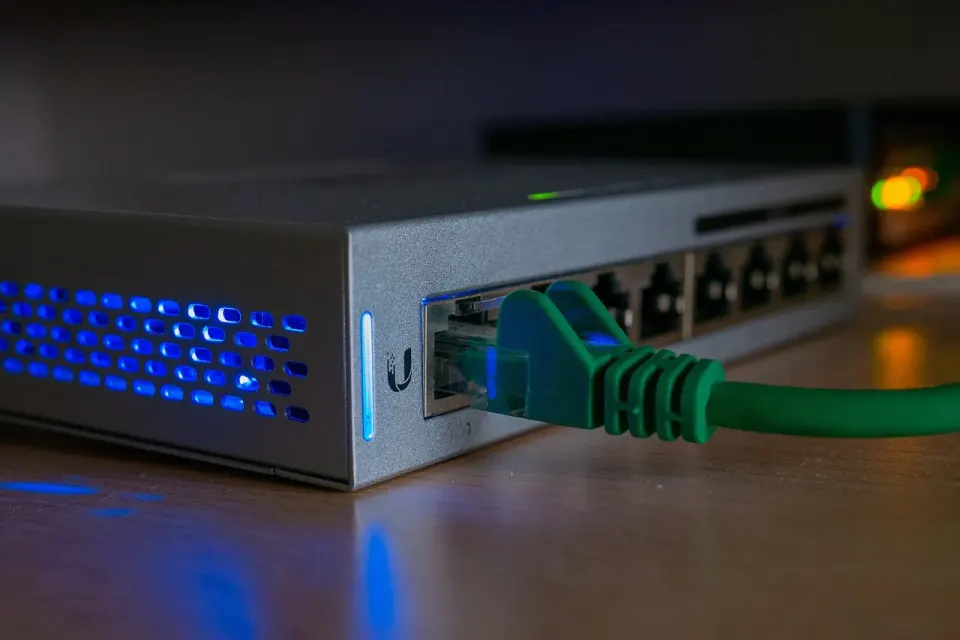
The FCC's tips say a direct ethernet cable to your router gives the highest speeds and avoids Wi-Fi congestion. It also suggests placing the router in a central spot, using a mesh system or extender for large homes, and disconnecting phones from Wi-Fi when cellular signal is good. Those steps cost little or nothing.
Misbehaving network gear can also cause outsized trouble. Our explainer on why one new router grounded US flights shows what happens when a single device floods a network with bad traffic. At home the stakes are smaller, but the lesson is the same: coordination and good behavior matter.
Age matters too. A router that is many years old may lack recent features and security updates, so replacing it can make sense even before Wi-Fi 8 is final. In that case, a current Wi-Fi 6 or Wi-Fi 7 model is the safer buy.
Here is a simple order of operations to try this week:
- Move the router to a central, open spot away from walls and large metal objects.
- Plug a desktop, TV or game console into the router with ethernet.
- Look at the list of nearby networks and switch to the less crowded band.
- Check for a firmware update from the router maker.
- Replace the router only if it is old enough that it lacks Wi-Fi 6 or newer.
Conclusion: Wait for the Standard, Fix the Basics Now
Wi-Fi 8 is a sensible idea. It aims at the thing people actually complain about, which is dropouts and lag, not the top speed on a box. The technology is real, but the products are early and the certification is still ahead.
For now, treat Wi-Fi 8 headlines with the same care as any new standard. Ask who tested the claim, on what hardware, and in what kind of home. Then spend ten minutes on the basics above, because they will help today and will still help once Wi-Fi 8 arrives.
What is Wi-Fi 8 and how is it different from Wi-Fi 7?
Is Wi-Fi 8 going to make my internet faster?
Should I buy a Wi-Fi 8 router now?
What can I do today to fix a Wi-Fi that keeps dropping?
In this story 6 sections
Keep Reading
All stories

The Odd List · Fridays